
Job Approval Groups are the ability to create workflows of selected users for a Job Approval.
-
To create a Job Approval Group, begin in the Settings area.

-
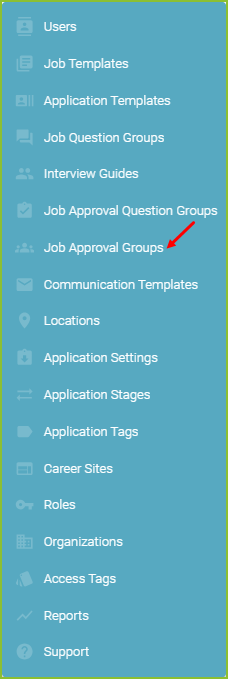
Click on Job Approval Groups.
-
Click New Job Approval Group to create a new Job Approval Group.

-
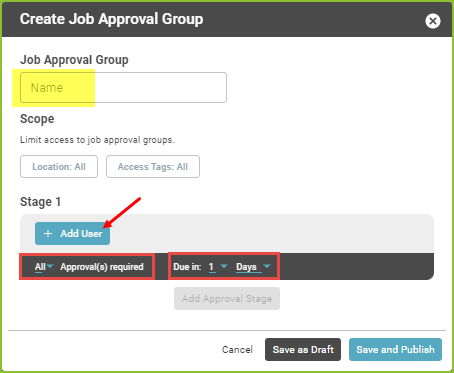
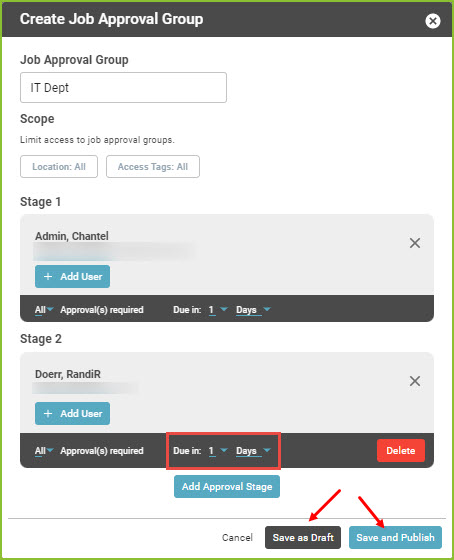
Add the Job Approval Group Name, such as Leadership Team, Indianapolis Market, IT Department, etc.
-
Click +Add User to add the Stage 1 Approver(s). This will be the first Approver(s) to receive the Job Approval request once it has been submitted for approval.
-
-
Multiple users may be added to each Stage.
-
Select Approval(s) required, as needed.
-
Adjust the Due in details, as needed.
-
-
-
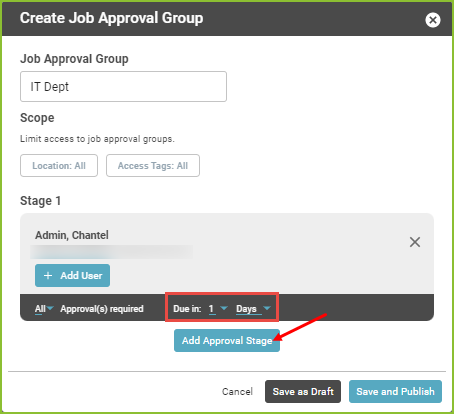
Add Additional Stage Approver(s), as needed.
-
Select the user.
-
Adjust the Due in details, as needed.
-
Click Save as Draft or Save and Publish.
Still need help? Submit a support request and our team will get back to you.